Your admissions team and your registrar are probably looking at two versions of the same student. One system says admitted, the other still says applicant, and someone is about to send the wrong email. Fixing it does not mean syncing everything. It means agreeing on three records, who owns each one, and how fast each should move.
CRM SIS integration means your admissions CRM and your student information system share three records automatically: the applicant, the admit decision and the enrollment status. Each record flows in one set direction on a set schedule. Everything else stays manual until there is a clear reason to automate it.
Most institutions bought the CRM to recruit and the SIS to run the academic record, often years apart and from different vendors. The gap between the two is where enrollment data goes wrong.
What goes wrong when the CRM and SIS don't talk
Three problems show up on almost every campus where the systems run separately:
- Duplicate records. The student ID never reaches the CRM, so the same person exists twice. Counselors keep calling an admitted student as a prospect.
- Wrong contact data. A student updates an email address in the portal, but the CRM keeps the old one. The yield campaign goes to an inbox nobody checks.
- Retyping. Staff copy decisions from one system into the other, or run nightly spreadsheet exports. Each step adds delay and errors.
The cost rarely shows up as a budget line. It shows up as melt nobody can explain, reports that don't match, and a registrar's office spending its busiest weeks on cleanup. Higher education data integration fixes the cause, and the 2026 EDUCAUSE Top 10 lists building a data-centric culture across the institution among its priorities for the year.
The three records that should sync automatically
You don't need to sync everything. Start with the three records that move a student from one stage to the next.
1. The applicant
The CRM tracks a prospect from inquiry to application. When the application is submitted, the SIS needs a person record. The SIS then sends its student ID back to the CRM, and that ID becomes the shared key that keeps both systems pointing at the same person.
2. The admit decision
Decisions are recorded in the SIS or its admissions module. The CRM needs them quickly, because the decision triggers the yield sequence: congratulations, deposit reminders and counselor follow-up.
3. The enrollment status
Deposit paid, registered, enrolled or withdrawn. The SIS owns this status. The CRM uses it to stop recruiting students who are already in, start onboarding, and spot summer melt early.
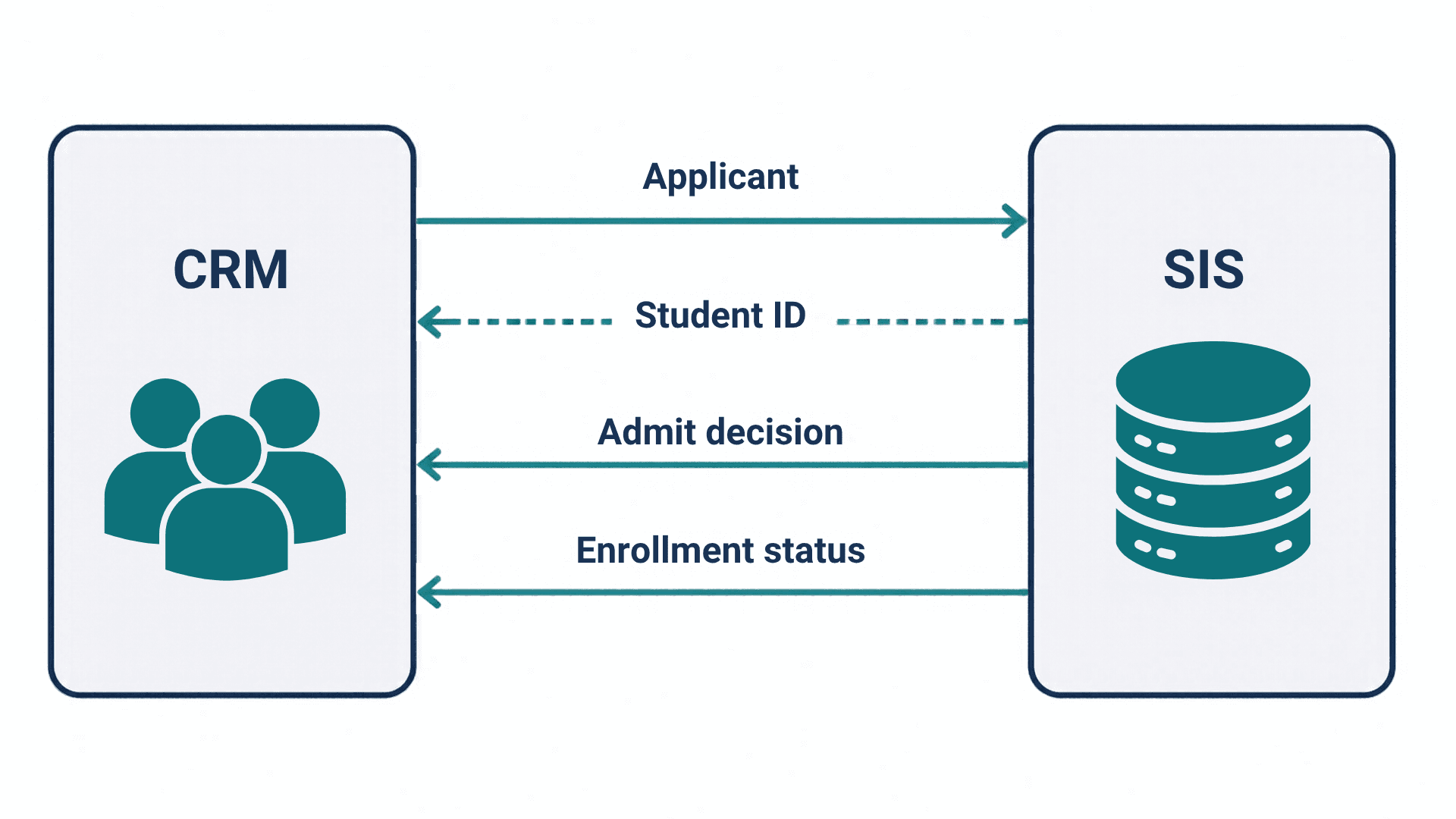
Direction and frequency: a CRM SIS integration sync map
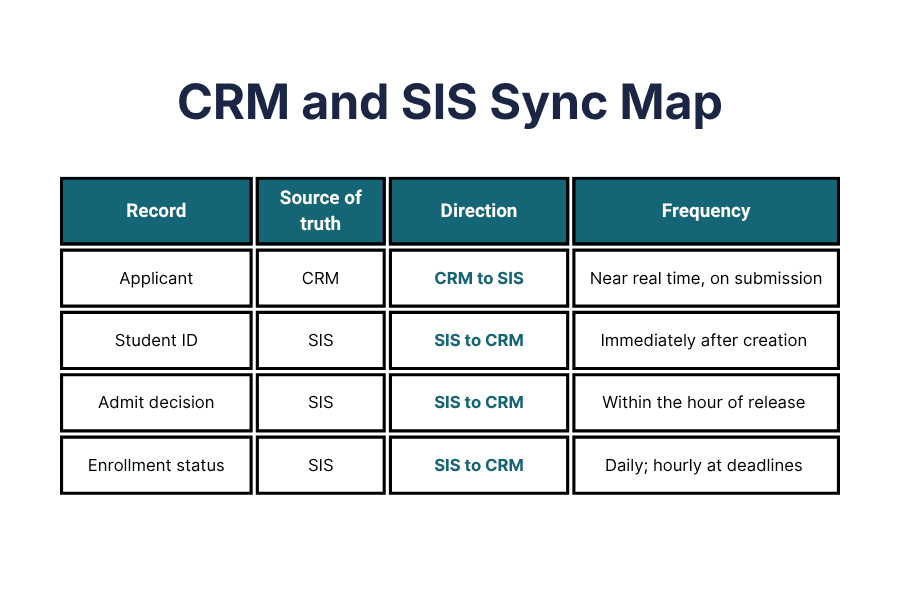
In student information system integration, every field needs one system of record. The other system reads it and never overwrites it.
Applicant
- Source of truth: CRM
- Direction: CRM to SIS
- Frequency: near real time, when the application is submitted
Student ID (the shared key)
- Source of truth: SIS
- Direction: SIS to CRM
- Frequency: immediately after the SIS creates the record
Admit decision
- Source of truth: SIS
- Direction: SIS to CRM
- Frequency: within the hour of each decision release
Enrollment status
- Source of truth: SIS
- Direction: SIS to CRM
- Frequency: daily, and hourly around deposit deadlines and add/drop
Avoid two-way sync on the same field unless you have written rules for conflicts. Standards are starting to help here. 1EdTech's Edu-API defines how administrative systems such as the SIS exchange data with other campus products, and Oracle announced in October 2025 that PeopleSoft Campus Solutions was the first SIS certified on it. Ask both of your vendors where they stand.
What to leave manual, and why
Automate what is frequent, rule-based and easy to reverse. Keep people on the rest:
- Exceptions. Conditional admits, appeals and deferrals need judgment. Sync the outcome after a person decides.
- Merging duplicates. Let the system suggest matches, but have a person approve each merge. A wrong merge is hard to undo.
- Financial aid details. Keep award amounts in the SIS or aid system. Send the CRM a status flag, such as "aid offer sent", not the figures.
- Historical cleanup. Clean old records before you connect the systems, not through the sync.
Build, buy or connect: three ways to integrate
Build
Custom code against both systems' APIs. You get full control, and you also own every fix when either vendor ships an upgrade. It fits institutions with a strong in-house integration team.
Buy
Use what your platform vendor offers. Salesforce Education Cloud puts recruitment and admissions on the CRM and points to MuleSoft for connecting other systems. A Salesforce SIS integration often runs this way. It works best when you have committed to one vendor's ecosystem.
Connect
Use a prebuilt connector made for higher education. It is faster to launch, with less flexibility than custom code. Talentus Global's SIS and CRM connectors cover Thesis Elements, Ellucian Banner, Anthology Student and Jenzabar on the SIS side, and Salesforce, Element451 and HubSpot on the CRM side, with bidirectional sync.
A simple test helps. If you sync a short list of standard fields and both systems have stable APIs, a connector or a platform tool is usually enough. If your process depends on custom logic, such as program-specific admission rules, budget for a build and for the team that will maintain it.
Whichever route you take, ask the same question: who watches the sync after launch, and who gets the alert when it fails?
How to roll it out in phases
An admissions CRM integration rarely fails on technology. It fails on timing and on unclear ownership. Phase it:
- Phase 1: map and clean. Agree on the system of record for each field, define the shared ID and remove duplicates.
- Phase 2: applicant and ID. Turn on the first sync and check it with admissions for one application cycle.
- Phase 3: admit decision. Test on a small decision release before the main one.
- Phase 4: enrollment status. Go live before deposit deadlines and add a daily report that compares counts in both systems.
End each phase with a sign-off from the office that owns the data: admissions for applicants, and the registrar for decisions and enrollment status.
Avoid going live during decision release or deposit weeks. Talentus Global implemented Salesforce CRM across all campuses of Universidad César Vallejo, an institution with more than 180,000 students. You can read more in our higher ed success stories or explore our Salesforce services.
FAQ
What is CRM SIS integration?
CRM SIS integration connects the system that recruits students, the CRM, with the system that holds the official academic record, the SIS. Records such as applicants, admit decisions and enrollment status move between them automatically, so admissions, the registrar and marketing all work from the same data without retyping it.
Which system should be the source of truth?
Each field needs one owner. The CRM usually owns prospect and inquiry data, including communication preferences. The SIS owns the official record: student ID, admit decision, enrollment status and grades. The other system reads those fields and never overwrites them, which stops two systems from correcting each other in a loop.
How often should a CRM and SIS sync?
It depends on the record. Applications and admit decisions should move within minutes or hours, because they trigger communications. Enrollment status can sync daily for most of the year, with more frequent syncs around deposit deadlines and add/drop. Faster is not always better, since every sync adds load and another point to monitor.
Can Salesforce connect to Banner or Thesis Elements?
Yes. Salesforce can connect to most student information systems through custom code, an integration platform such as MuleSoft, or a prebuilt connector. The right option depends on how many fields you need to sync, how often your SIS changes, and who will maintain the connection after launch.
Next step
Before you build a sync from scratch, explore the Connectors Marketplace to see which SIS and CRM pairs are ready to connect. Need help drawing your sync map? Talk to an EdTech specialist.