The tool behind your next incident is probably already approved. It is small, it solved a real problem for one department, and it holds a standing connection to your student system that nobody has looked at since launch day. Before the next one goes live, run it past four baselines. They fit on one page and take far less time than an incident review.
EdTech integration security comes down to four baselines you confirm before a tool connects to a core system: identity through single sign-on, API scope limited to least access, logging on every sync, and a vendor security review. If one of the four is missing, the integration is not ready to go live.
October is Cybersecurity Awareness Month, a good moment to look at the connections you already have. Most campuses protect the SIS, the LMS and the CRM carefully. The risk sits in the small tools plugged into them.
Why integrations are the weak point on campus
The 2026 Verizon Data Breach Investigations Report found third-party involvement in 48% of all breaches, up 60% from the year before. In educational services, the figure was 40%.
The pattern is familiar. A department buys a scheduling app, a proctoring tool or a chatbot. Someone creates a service account so it can read from the student information system. The tool works, the project closes, and the connection stays open for years. Three things tend to go wrong:
- The service account has more access than the tool needs, because broad access was faster to set up.
- Staff log in to the tool with local passwords that never pass through campus identity.
- Nobody watches the sync, so a failure or an unusual data pull goes unnoticed.
Third-party vendor risk in higher education is rarely about the big platform. It is about the fifteenth tool connected to it. A campus cybersecurity baseline for integrations fixes this without slowing every purchase, because it asks the same four questions every time.
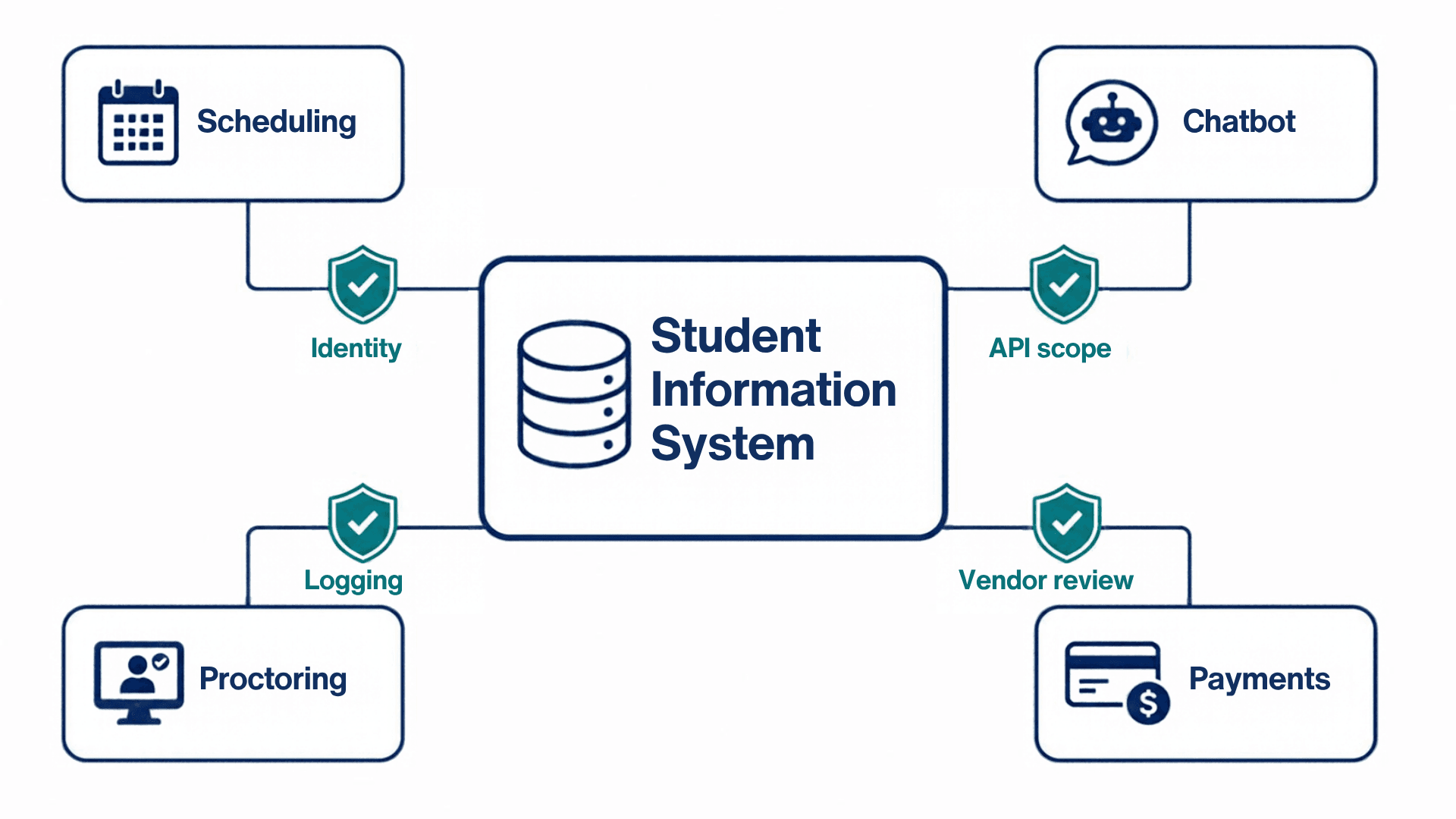
Baseline 1: identity and single sign-on
Every person who uses the tool should log in through the campus identity provider, with multi-factor authentication. No local accounts and no separate passwords.
The reason is offboarding. When someone leaves, disabling one account should remove access everywhere. A tool with its own user list breaks that.
Confirm before launch:
- The tool supports SAML or OpenID Connect and is connected to your identity provider.
- Multi-factor authentication is enforced, including for the vendor's own administrators.
- Accounts are removed automatically when a person leaves or changes role.
- There are no shared logins.
If the tool touches financial aid data, this is also a compliance point. The FTC Safeguards Rule requires multi-factor authentication for anyone accessing customer information.
Baseline 2: API scope and least access
The integration is a user too. It holds a credential, usually a service account or an API key, and SIS integration security depends on what that credential is allowed to do.
Start from the data the tool needs and grant exactly that. A scheduling tool needs course enrollments. It does not need Social Security numbers or aid packages. Make access read-only unless the tool has to write back.
API security in EdTech fails most often on authorization. Broken authorization leads the OWASP API Security Top 10, ahead of every other risk on the list.
Confirm before launch:
- Each integration has its own credential. It is never shared and never tied to a person's account.
- The scope is written down: which records, which fields, read or write.
- Secrets are stored encrypted and rotated on a schedule.
- The integration has a named owner in IT and one in the department.
Baseline 3: logging and monitoring every sync
Every sync should leave a record: when it ran, how many records moved, and whether it succeeded. Two alerts matter most. One fires when a sync fails. The other fires when the volume is far outside the normal range.
A failed sync that nobody sees means staff are working from wrong data. A sudden jump in records pulled can be the first sign of misuse. The Safeguards Rule points the same way: keep a log of authorized users' activity and watch for unauthorized access.
Confirm before launch:
- Sync logs exist, and your team can read them without asking the vendor.
- Failure and volume alerts go to a monitored queue, not one person's inbox.
- Logs are kept long enough to support an investigation.
As one example of what good looks like, Talentus Global's EdTech connectors encrypt credentials with AES-256, run on Azure, AWS or Google Cloud, and include an admin portal with sync logs, status dashboards and alerts when a sync fails.
Baseline 4: vendor security review
Higher education has a shared tool for this. The HECVAT from EDUCAUSE is a standard questionnaire that vendors complete on their security, privacy and compliance practices. Ask for it first. Many vendors already have one ready.
Then check four things the questionnaire alone will not settle:
- An independent audit report, such as SOC 2 Type II, from the last 12 months.
- Breach notification terms in the contract, with a deadline.
- The list of subprocessors that will handle your data.
- What happens to your data when the contract ends.
Scale the review to the data involved, and repeat it at renewal. The Safeguards Rule expects periodic reassessment of service providers, and the NIST Cybersecurity Framework treats supplier risk as an ongoing governance task. If the tool uses AI, add the questions from our post on AI data security in higher education.
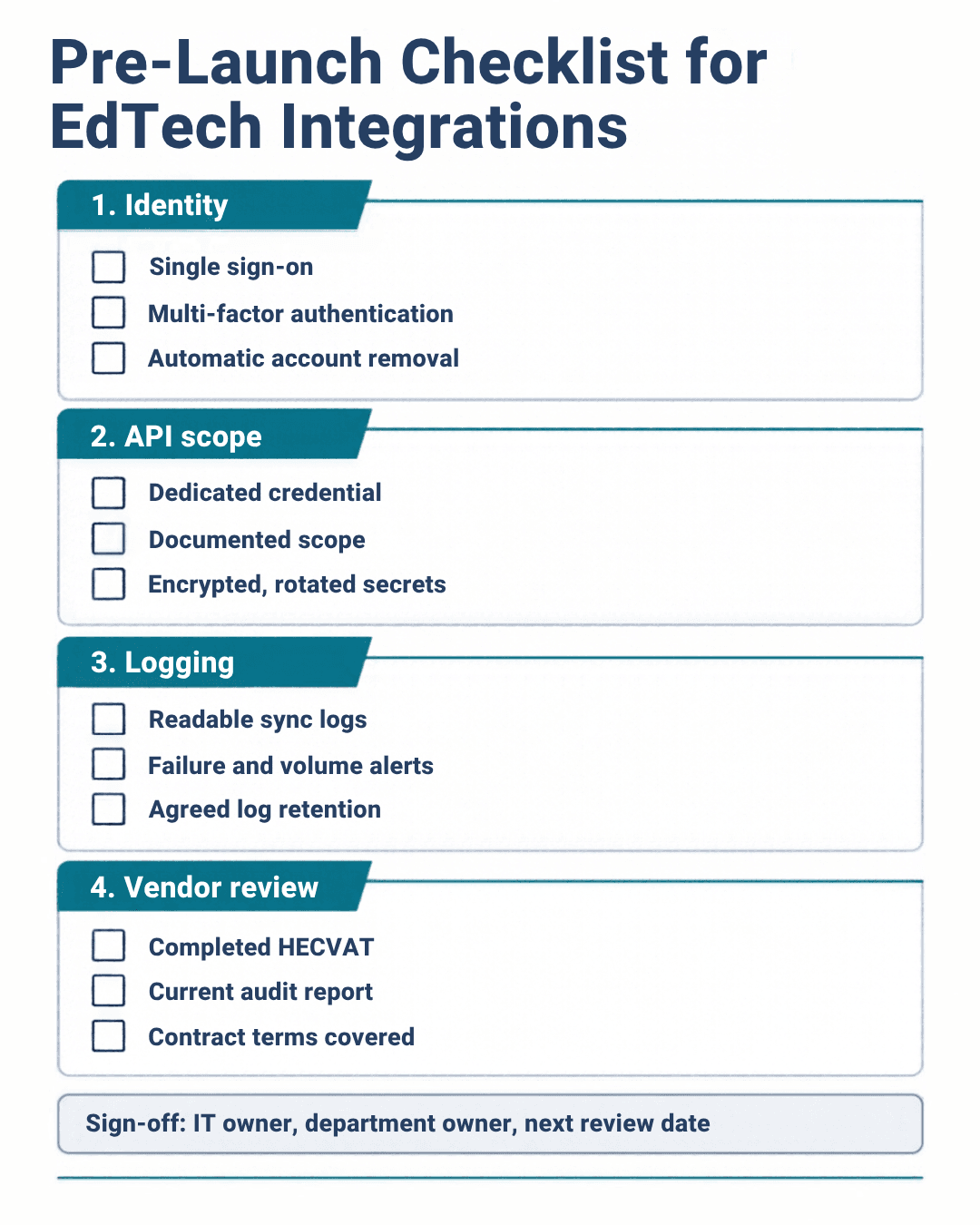
A one-page EdTech integration security checklist
Use this before any integration goes live. If a box stays empty, the launch waits.
- Identity
- Single sign-on through the campus identity provider
- Multi-factor authentication enforced, vendor admins included
- Automatic removal of accounts when people leave
2. API scope
- Dedicated credential for this integration
- Scope documented by record, field and read or write
- Secrets encrypted and on a rotation schedule
3. Logging
- Sync logs your team can read
- Failure and volume alerts sent to a monitored queue
- Log retention period agreed
4. Vendor review
- Completed HECVAT on file
- Current independent audit report
- Breach notice, subprocessors and data deletion covered in the contract
Sign-off: a named owner in IT, a named owner in the department, and a date for the next review.
Small IT teams often know what to check but lack the hours to check it. That is where outside help earns its place. Talentus Global's managed IT services include security and compliance support.
FAQ
What is EdTech integration security?
EdTech integration security is the set of controls that protect the connections between campus systems and third-party tools. It covers who can log in, what data each integration can reach, how every sync is recorded, and whether the vendor has been reviewed. The goal is that no connected tool becomes an easier way into core systems.
Which integrations should be reviewed first?
Start with any tool that connects to the student information system, financial aid or payment data. Then rank the rest by the sensitivity of the data they touch and by how long ago they were approved. Integrations set up years ago with broad service accounts are usually the highest risk.
What is the HECVAT?
The HECVAT is the Higher Education Community Vendor Assessment Toolkit, maintained by EDUCAUSE. It is a standard questionnaire that vendors complete to describe their security, privacy, accessibility and compliance practices. Institutions use it to compare vendors on the same questions instead of writing a new security review for every purchase.
Does a small tool with little data need the full review?
No. Scale the review to the data. A tool that touches student records or financial aid gets all four baselines and a full vendor assessment. A tool that holds no personal data still needs single sign-on and a named owner, but the vendor review can be a short version.
Next step
Connecting a new tool this term? Talk to an EdTech specialist before your next integration.