Colleges replace their student information system so rarely that few people on the team have done it before. That is where selections go wrong: polished demos, first-year prices and promises about the roadmap. This guide gives you the questions to ask, the costs to add up and the warning signs to watch for, plus a checklist for your very first RFP meeting.
A good student information system RFP starts with your own problems, not a vendor's feature list. Bring the registrar, financial aid, IT, finance and students in early, ask every vendor the same written questions, and compare the total cost over five years, not the first-year price. Then test data migration and integrations before you sign.
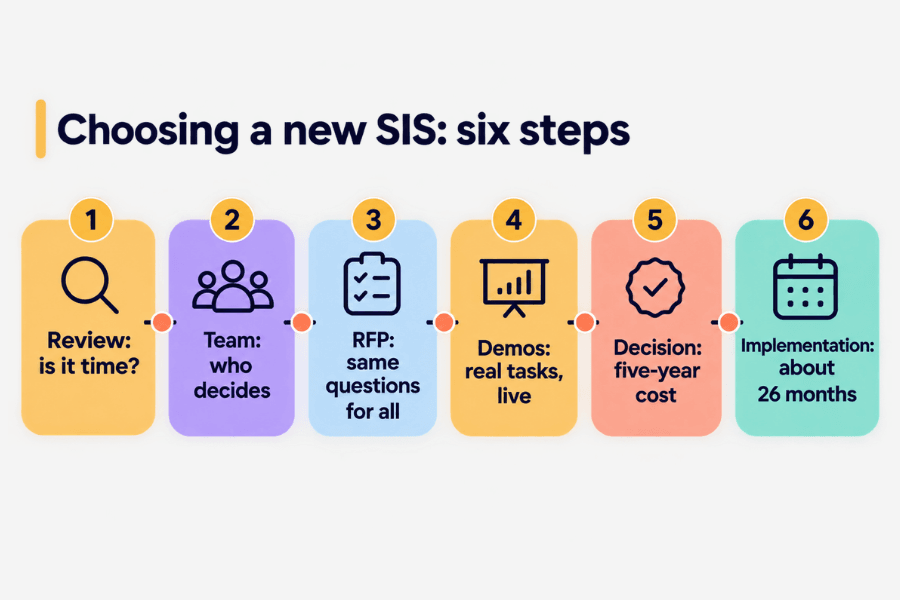
Your student information system (SIS) holds enrollment, schedules, grades, transcripts and much of financial aid. Replacing it touches almost every office on campus, and it takes time: a ListEdTech review of 289 higher education implementations found that a new system took about 26 months to put in place. That is why knowing how to choose an SIS matters before the first vendor call.
The market is also moving. Ellucian completed its purchase of Anthology’s SIS and ERP business on December 31, 2025, adding more than 260 institutions to its customer base. Changes like this lead many colleges to step back and ask whether their system still fits. This guide walks through the process in plain steps.
Signs it is time to review your SIS
- Staff keep side spreadsheets because the system cannot give them what they need.
- Simple changes, like a new program or fee, need a vendor ticket or custom code.
- Students cannot register, pay or check their aid easily on a phone.
- Reports for leadership or the state take days of manual work.
- Your vendor has changed owners or plans, and you are not sure what support will look like in three years.
- Other systems only connect through nightly file uploads that often break.
One or two of these are normal. Four or more usually mean it is time for a structured SIS selection. But check one thing first. The EDUCAUSE 2026 Top 10 reminds leaders that an institution may not be using its current system to its full potential. Sometimes better training, an upgrade or new integrations solve the problem for far less.
Who should be at the table
A new SIS is not an IT project. It is a campus project that IT helps run. Build a small core team with the authority to decide, plus a wider group that tests and gives feedback.
Registrar
Owns the catalog, registration, academic records and transcripts. The registrar knows the exceptions and local rules that no vendor demo will show.
Financial aid
Handles aid packages, federal reporting and the link to the student account. Many SIS projects slip here, so involve this office from day one.
IT and data
Covers security, integrations, data migration, and who can log in to what.
Finance
Owns the total cost, contract terms and student billing, and the connection to the higher education ERP (enterprise resource planning), the system that runs finance and HR.
Students and advisors
They use the system every day. Invite a few to demos and ask them to complete real tasks.
Finally, name one executive sponsor who can break ties, and one project manager who keeps the calendar honest.
What to ask vendors: the student information system RFP checklist
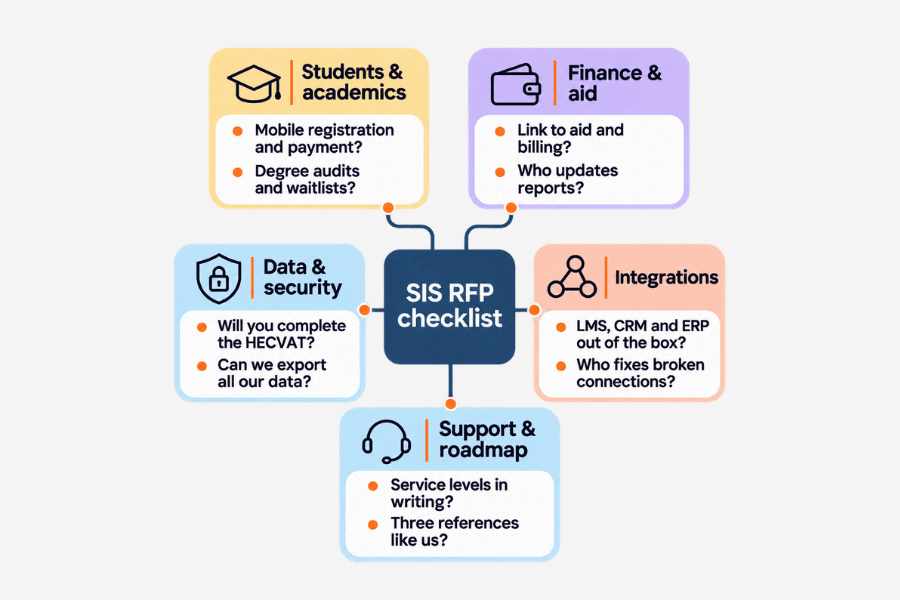
Ask every vendor the same written questions and score the answers the same way. Group the questions by topic so each office can own its section.
Students and academics
- Can students register, change classes, pay and see their aid on a phone?
- How do you handle degree audits, waitlists and non-credit programs?
- How does the system meet accessibility standards (WCAG 2.1 AA)?
Finance and financial aid
- How does the SIS connect to financial aid and student billing?
- Which federal and state reports are built in, and who updates them when rules change?
Data and security
- Where is our data hosted, and who can access it?
- Will you complete the HECVAT, the EDUCAUSE security questionnaire for vendors?
- How do you help us comply with FERPA, the US student privacy law?
- Can we export all of our data at any time, in a usable format?
Integrations
- Which systems do you connect with out of the box: learning management system (LMS), CRM, ERP, ID cards, housing?
- Do you offer open, documented APIs (ways for systems to share data), and is there a cost per connection?
- Who fixes an integration when it breaks?
Support and roadmap
- What do your service levels promise, in writing?
- What is on your roadmap for the next three years?
- Can we talk to three institutions like ours, including one that went live in the last 18 months?
Comparing total cost and implementation time honestly
The first-year price is the smallest part of the bill. Ask each vendor for a five-year total and line up the pieces side by side:
- Subscription or license fees, and how they rise each year
- Implementation services from the vendor and any partner
- Data migration and cleanup
- Integrations, including the ones you already maintain
- Training, staff time and backfill for people pulled into the project
- Ongoing support and hosting
Then look at the SIS implementation timeline. Ask for a phased plan with dates for admissions, records, financial aid and student accounts. Ask what your institution must deliver at each step, not only what the vendor will do. A short timeline that depends on staff you do not have is not a short timeline. The 26-month figure above is a useful reality check when a proposal promises much less.
Data migration and integrations: the questions most RFPs miss
Most SIS projects that run late do not fail on features. They stall on data and connections. Before you sign, ask:
- How many years of history will we move, and what stays in an archive?
- Who cleans duplicate or broken records, and when?
- How many practice migrations are included before go-live?
- How will the new SIS share data with our CRM, LMS and ERP while the old and new systems run side by side?
Integrations deserve their own plan. Your SIS sends class rosters to the LMS, applicant status to the CRM and billing to the ERP. Talentus Global’s Connectors Marketplace, for example, links SIS platforms such as Thesis Elements, Ellucian Banner, Anthology Student and Jenzabar with LMS, CRM, ERP and financial aid systems. For more on lining up admissions and registrar records, see our guide to integrating CRM and SIS.
Red flags during demos
Give vendors a script based on your real work: register a student who has a hold, change a program, adjust an aid award. Then watch for these signs.
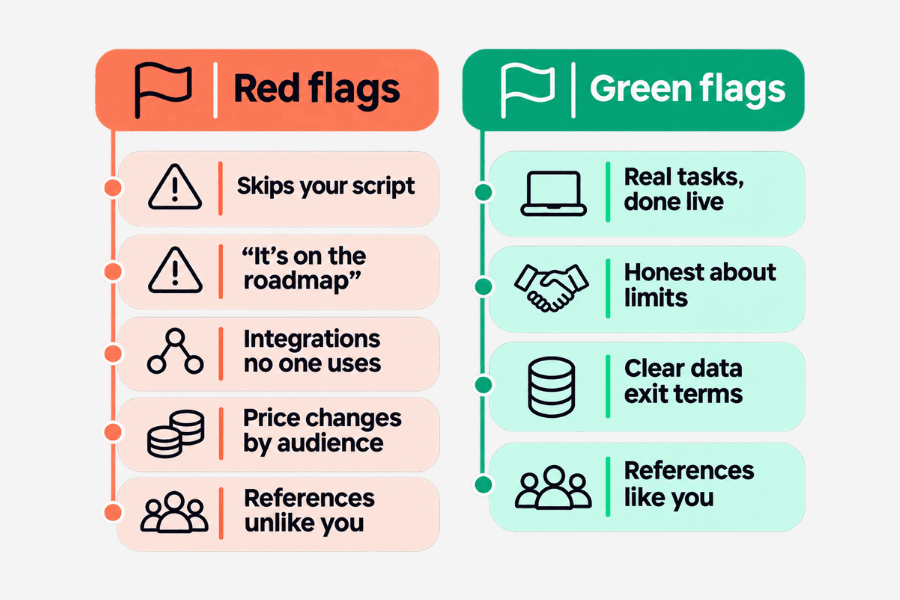
Red flags
- The demo skips your script and goes back to slides.
- Answers to core needs start with “that is on the roadmap.”
- Integrations are “possible,” but no live customer uses them.
- The price changes depending on who is in the room.
- References come from institutions very different from yours.
Green flags
- Staff complete real tasks live, in the product you would buy.
- The vendor tells you what the system does not do well.
- Clear data export and exit terms in the contract.
- References that match your size, type and systems.
A checklist for your first RFP meeting
- Write down the five problems the new SIS must solve.
- Name the executive sponsor, project manager and core team.
- Agree on scoring criteria before anyone reads a proposal.
- List every system that connects to your SIS today.
- Decide how much history to migrate.
- Build a five-year cost template for vendors to fill in.
- Write demo scripts based on real tasks.
- Add the HECVAT and data export terms to the RFP.
If your team needs support, Talentus Global’s EdTech practice helps with SIS selection and implementation services, from RFI and RFP work to project management, migration and ongoing support. Its partner network of student information systems and other platforms includes Thesis, a cloud-based SIS, as one option among several.
FAQ
What should a student information system RFP include?
It should include your goals, the problems the new system must solve, and the same written questions for every vendor. Cover students and academics, finance and aid, data and security, integrations, and support. Ask for a five-year cost, a phased timeline, completed security answers and references from institutions like yours.
How long does an SIS implementation take?
Longer than most proposals suggest. A ListEdTech analysis of 289 higher education projects found that a new system took about 26 months on average. Your timeline depends on how much data you move, how many integrations you need, and how much staff time your institution can give the project each week.
Do we need outside help to choose an SIS?
Not always, but it helps if your team has not run a selection before. An experienced partner can write the RFP, build demo scripts, compare costs fairly and plan the migration. Choose one that is vendor-neutral during selection, or that clearly tells you which platforms it partners with.
Should we replace our SIS and higher education ERP at the same time?
Some institutions do, but it doubles the change for staff. Many replace one system first and connect it to the other with reliable integrations. Decide based on the age of each system, your budget and your team's capacity, and make sure the plan keeps student, billing and finance data in sync.
Next step
Choosing an SIS shapes how your campus works for the next ten years or more. A clear process, the right people and honest questions make the decision easier to defend. Talk to an EdTech specialist about your SIS selection.